
Data4 vs Clicky vs Pirsch: Which Analytics Tool Fits You?
Choosing a website analytics platform in 2026 often comes down to three competing priorities: simplicity, depth, and privacy compliance. Data4, Clicky, and Pirsch each represent a different answer to the Google Analytics problem. Data4 emphasizes a straightforward, globally accessible dashboard. Clicky leans into real-time visitor-level detail. Pirsch builds its reputation on cookie-free, open-source privacy. This comparison breaks down where each tool genuinely excels and where it falls short, so you can pick the one that matches how your team actually works.
How the Three Tools Position Themselves
Before diving into feature-by-feature comparisons, it helps to understand what each platform is trying to be.
Data4 positions itself as a simple, efficient Google Analytics replacement with global reach. Its interface is available in Chinese, English, and Japanese, and it emphasizes domain-specific localization. The pitch is straightforward: get actionable traffic insights without the learning curve of GA4 or the configuration overhead of enterprise platforms. Data4 suits website owners and marketers who want dashboards that answer basic questions quickly.
Clicky takes a different path. It has served over one million websites and focuses on real-time, visitor-level analytics. You can watch individual visitors move through your site as it happens, see their actions, and even attach custom data like usernames or emails to sessions. Clicky is GDPR-conscious but not cookie-free; it anonymizes data by default and includes aggressive bot filtering.
Pirsch is the privacy purist of the group. It is open-source, cookie-free, and collects no personal data by default. The dashboard is deliberately minimal, and pricing starts low. Pirsch targets developers, agencies, and enterprises that need defensible GDPR compliance without consent banners.
Real-Time Tracking: Where Clicky Leads
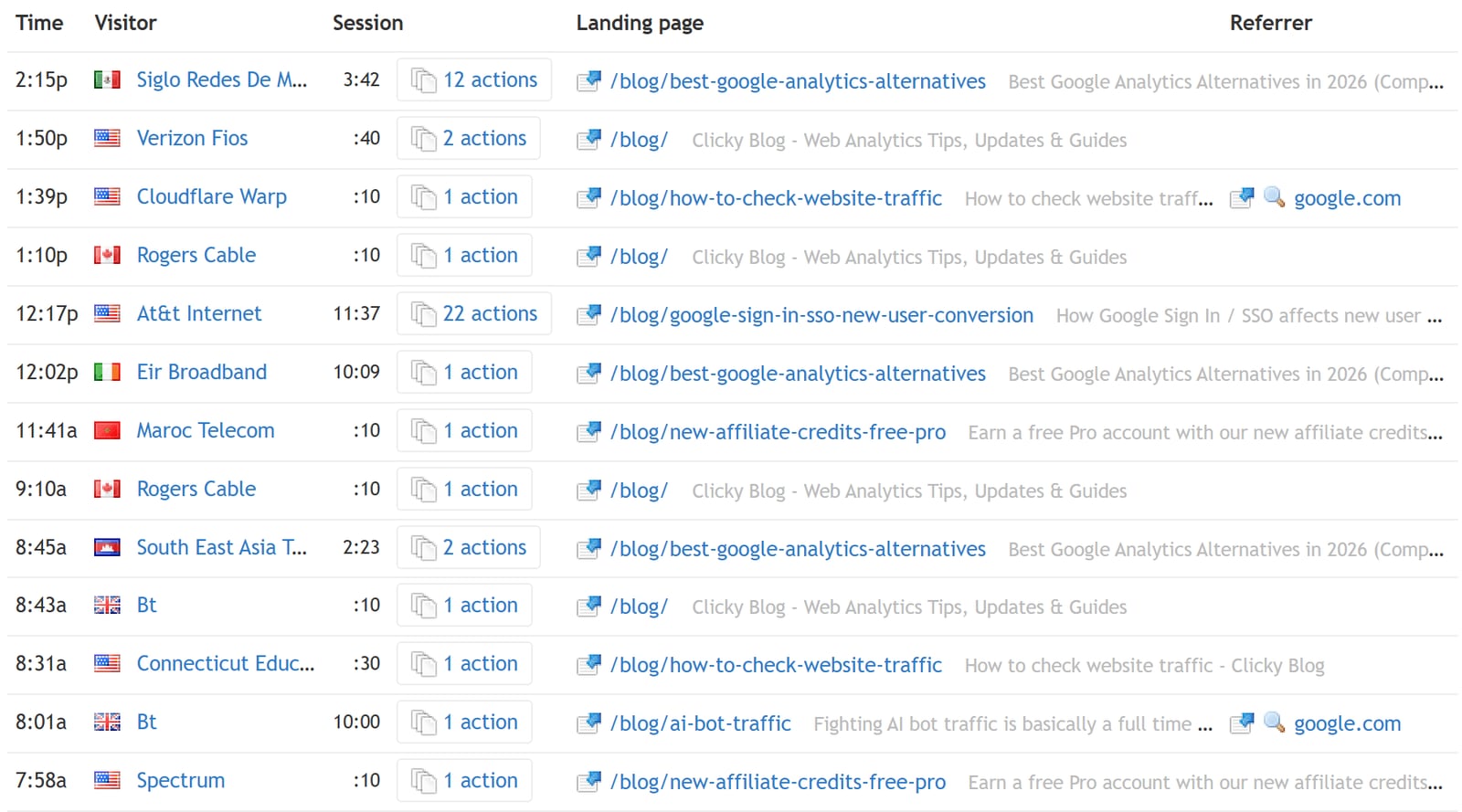
Monitor, analyze, and react to your visitors in real-time.
If live visibility is your priority, Clicky is the clear winner among these three. Its real-time visitor log shows individual sessions, actions, and referral paths as they happen. You can click into a single visitor and see their full journey across pages, including heatmaps of where they clicked.
Data4 offers real-time traffic tracking as part of its core feature set, but it presents this at an aggregate level rather than as a per-visitor stream. You will see current active users and page-level activity, which is enough for monitoring campaign launches or content spikes, but you will not get the granular, session-by-session replay that Clicky provides.
Pirsch updates its dashboard in near real time, but its privacy-first architecture means it does not track individual visitor sessions in the same way. You see aggregated page views, referrers, and events, not named or pseudonymous visitor journeys.
Practical example: A news publisher that needs to watch a breaking story gain traction minute by minute will get far more value from Clicky's live visitor log. A marketing team that just needs to confirm a campaign is driving traffic will find Data4 or Pirsch sufficient.
Privacy and Compliance: Pirsch Sets the Standard
Data4 vs Clicky vs Pirsch: Which Analytics Tool Fits You? - Privacy and Compliance: Pirsch Sets the Standard.
For organizations operating under strict GDPR requirements, Pirsch has a structural advantage. Because it is cookie-free and collects no personal data, Pirsch can often operate without a consent banner entirely. This removes a significant source of friction and legal risk. The platform's open-source code also lets technical teams audit exactly what data is collected and how it is processed.
Clicky takes a middle path. It anonymizes visitor data by default and is GDPR-compliant, but it still uses cookies and tracks individual sessions. You may need a consent mechanism depending on your jurisdiction and how you configure the tool. Clicky's reverse proxy tracking feature is notable here: it can capture visitors who use ad blockers, which many privacy-focused tools miss.
Data4 does not market itself as a privacy-first tool in the same way. Its value proposition centers on simplicity and global usability rather than regulatory compliance. If GDPR compliance is your primary decision driver, Pirsch is the stronger choice. For a deeper look at how to stay compliant while keeping useful analytics, see our guide on how to comply with GDPR analytics in 2026.
Ease of Use and Interface

Data4 vs Clicky vs Pirsch: Which Analytics Tool Fits You? - Ease of Use and Interface.
Data4's strongest supported advantage is its simplicity and global accessibility. The platform is designed for users who find GA4 overwhelming. Multi-language support in Chinese, English, and Japanese makes it a practical choice for international teams and businesses targeting Asian markets. The dashboard focuses on core metrics: traffic sources, visitor behavior, engagement, and conversions, presented without excessive configuration.
Clicky's interface is functional but denser. It packs a lot of information into the dashboard, which is powerful for analysts but can feel cluttered for casual users. The learning curve is moderate: you can get basic stats quickly, but unlocking the full value of visitor logs, custom data logging, and segmentation takes time.
Pirsch's dashboard is intentionally minimal. It shows the essential metrics in a clean layout, which makes it easy to read but limits depth. Users who want advanced segmentation or custom reports may find Pirsch too sparse.
Decision point: If your team includes non-technical stakeholders who need to check analytics without training, Data4's simplicity is a genuine advantage. If you have a dedicated analyst who wants depth, Clicky rewards the extra effort.
Feature Depth: Clicky's Breadth vs. Focused Alternatives
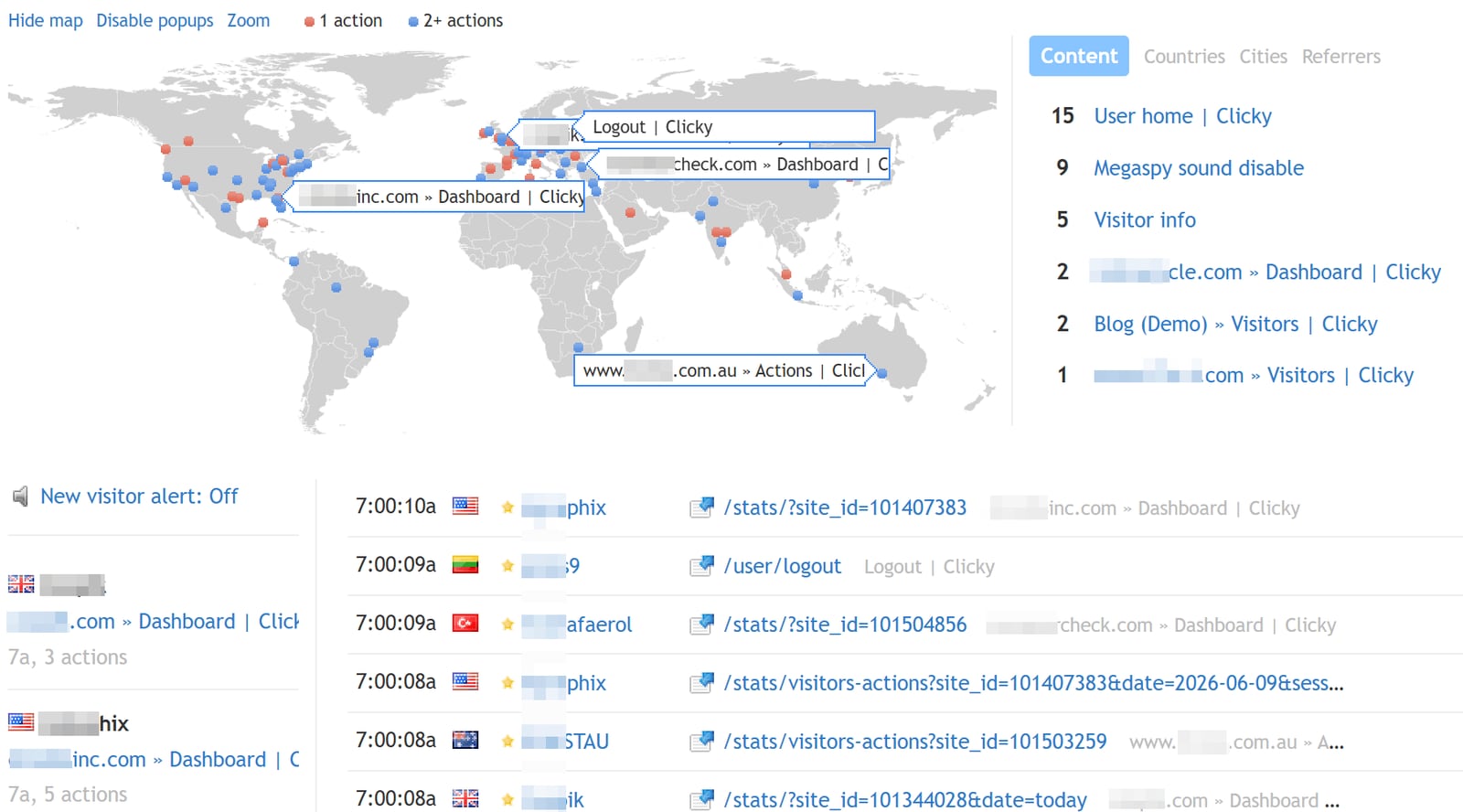
Monitor, analyze, and react to your visitors in real-time.
Clicky offers the most extensive feature set of the three. Beyond real-time visitor logs, it includes:
- Individual visitor and action tracking
- Custom data logging, such as attaching usernames or emails to sessions
- AI analytics that separates traffic from AI chatbots
- Reverse proxy tracking for adblock visitors
- API access, widgets, and white label options
- Content and referrer reports with basic segmentation
This breadth makes Clicky a strong choice for developers and marketers who want a single tool that answers many questions. The AI analytics feature is particularly forward-looking, as AI crawler traffic increasingly distorts traditional analytics data.
Pirsch focuses on doing fewer things well. Its feature set includes core web analytics, event tracking, a built-in URL shortener, and API access. The URL shortener is a unique touch that agencies find useful for campaign tracking. However, Pirsch does not offer the visitor-level detail or custom data logging that Clicky provides.
Data4's feature set centers on the essentials: real-time tracking, audience segmentation, conversion analysis, and customizable dashboards. It does not claim the advanced capabilities of Clicky, and this comparison should not imply otherwise. Data4's strength is delivering these core features with less friction, not matching Clicky feature-for-feature.
Pricing: What You Get at Each Tier
Pricing models differ significantly across the three tools.
Clicky uses a freemium model. The free plan covers a single website with limited page view tracking. Paid tiers—Pro, Pro Plus, Pro Platinum, and Custom—increase website and page view limits while unlocking premium features. A 21-day free trial of the premium service is available without a credit card. This makes Clicky accessible for small sites but potentially expensive as traffic scales.
Pirsch starts at $6 per month for 10,000 page views, with a 30-day free trial that requires no credit card. The pricing is straightforward and scales predictably with traffic. For small to medium sites, Pirsch is often the most affordable privacy-focused option.
Data4's pricing is not publicly detailed in the available product context. When evaluating Data4, request current pricing directly, as it may vary by region or feature tier.
For teams comparing Data4 against other tools in the same category, our Data4 vs KISSmetrics comparison and Data4 vs GoatCounter comparison provide additional context on where Data4 fits in the broader analytics landscape.
Ad Blocker and Bot Handling
Ad blockers and bots distort analytics data in different ways, and the three tools handle them differently.
Clicky's reverse proxy tracking is a standout feature. By routing tracking through your own domain, Clicky can capture visitors that browser-based ad blockers would normally hide. This gives a more complete picture of actual human traffic. Clicky also applies aggressive bot and referrer spam detection to keep data clean.
Pirsch's cookie-free approach means it is less affected by cookie-blocking browser features, but standard ad blockers can still block its tracking script. Pirsch does not advertise a reverse proxy solution as a core feature.
Data4 does not publicly emphasize adblock or bot-handling capabilities. If accurate traffic counts in an adblock-heavy audience matter to you, Clicky has a documented advantage.
Which Tool Should You Choose?
Your choice depends on what problem you are actually solving.
Choose Clicky if:
- You need real-time, visitor-level detail
- You want to attach custom data like usernames to sessions
- Adblock visitors matter to your traffic accuracy
- You value a broad feature set over a minimal interface
Choose Pirsch if:
- GDPR compliance without consent banners is non-negotiable
- You prefer open-source software you can audit
- You want predictable, low-cost pricing
- A clean, minimal dashboard meets your needs
Choose Data4 if:
- Your team needs a simple, globally accessible dashboard
- Multi-language support matters for your organization
- You want core analytics without GA4 complexity
- You are replacing Google Analytics and value ease of migration
No single tool wins on every axis. Clicky wins on depth and real-time visibility. Pirsch wins on privacy and compliance. Data4 wins on simplicity and global accessibility. The right choice is the one that aligns with your team's skills, your compliance obligations, and the questions you actually need to answer.
Related reading
- Simple Analytics Review 2026: Privacy-First, But Is It Enough? - Evidence-based Simple Analytics review covering privacy, pricing, setup, event tracking, limitations, and who should actually use it in 2026.
- Product Intelligence: What It Is and How to Use It in 2026 - Learn what product intelligence is, how it differs from product analytics and BI, and how to build a practical product intelligence workflow in 2026.
Sources and further reading
- Even Connect · 1000 connections, zero middleman - Connect your AI agents to 556+ services (Stripe, Slack, Notion, Cloudflare, Linear, and more) with keys that never leave your machine. One MCP, a few meta-tools, no context bloat. Search the full catalog.
- AdguardFilters/SpywareFilter/sections/tracking_servers.txt at master · AdguardTeam/AdguardFilters - AdGuard Content Blocking Filters. Contribute to AdguardTeam/AdguardFilters development by creating an account on GitHub.
- https - AdGuard - ... data4.net^ ||heap-api.com^ ||analytics.vinovo.si^ ||cs.media.net^ ||bidder ... pirsch.io^$third-party ||d2g2u2795e3fzw.cloudfront.net^ ||mobiexchange ...
Frequently Asked Questions
Is Clicky or Pirsch better for GDPR compliance?
Pirsch is generally the stronger choice for GDPR compliance because it is cookie-free and collects no personal data by default. This often eliminates the need for a consent banner. Clicky is GDPR-compliant when configured correctly, but it uses cookies and tracks individual sessions, so you may still need consent mechanisms.
Does Data4 offer a free trial?
Data4's trial availability is not specified in the available product information. Contact Data4 directly for current trial and pricing details. Clicky offers a 21-day premium trial without a credit card, and Pirsch offers a 30-day free trial without a credit card.
Can Clicky track visitors who use ad blockers?
Yes. Clicky's reverse proxy tracking feature routes analytics through your own domain, which allows it to capture visitors that standard browser-based ad blockers would otherwise hide. This is a distinctive capability not prominently offered by Data4 or Pirsch.
Is Pirsch really open-source?
Yes. Pirsch is an open-source analytics platform, which means you can inspect the source code and, if you choose, self-host it. This transparency is a key part of its privacy positioning.
Which tool is best for a small business website?
For a small business, Pirsch offers the most predictable pricing at $6 per month for 10,000 page views. Clicky's free plan can work for very small sites. Data4 is worth evaluating if your business serves a multilingual audience and needs a simple dashboard.
Conclusion
Data4, Clicky, and Pirsch solve different versions of the same problem. Clicky is the power user's choice, offering real-time visitor detail and advanced features that justify its steeper learning curve. Pirsch is the compliance-first choice, delivering cookie-free analytics that keeps legal teams happy without breaking the budget. Data4 is the accessibility choice, providing a simple, multilingual dashboard for teams that want answers without complexity. Match the tool to your team's actual workflow, and you will get more value from your analytics than any feature checklist alone can deliver.