
Individual Visitor Behavior Analysis: A Practical Guide
Most analytics reports tell you what happened across your site. Individual visitor behavior analysis tells you what happened to one person — and why it matters. By connecting a single visitor's clicks, scrolls, form fills, and navigation choices into a coherent journey, you can spot friction that aggregate dashboards hide.
This guide explains how individual visitor behavior analysis works, which metrics to track, how to set up privacy-compliant tracking, and how to turn single-visitor insights into site-wide improvements.
What Is Individual Visitor Behavior Analysis?
Individual Visitor Behavior Analysis: A Practical Guide - What Is Individual Visitor Behavior Analysis?.
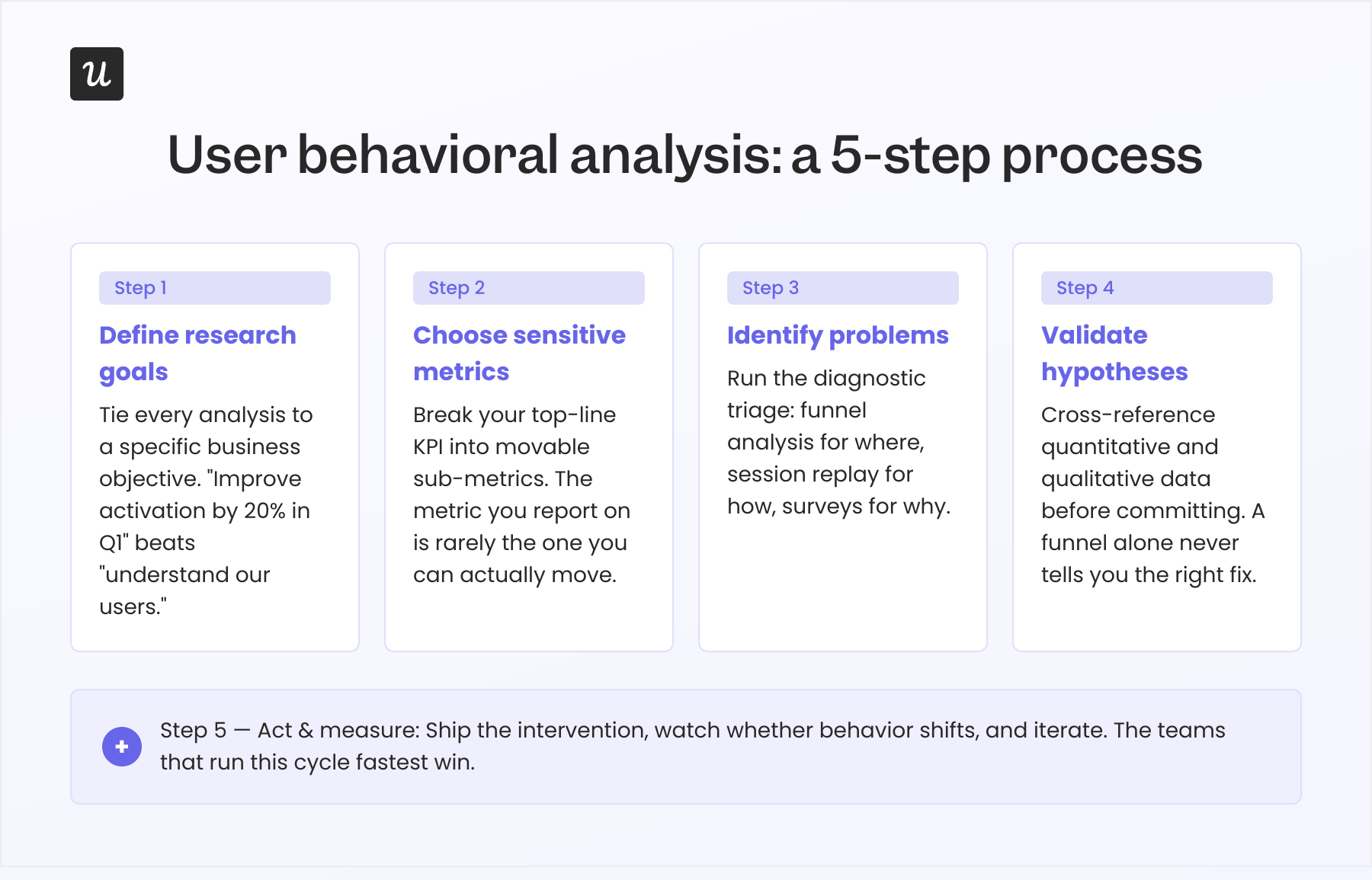
Individual visitor behavior analysis is the practice of tracking and interpreting how one visitor interacts with your website across a session or over time. Instead of looking only at averages, you reconstruct a specific journey: which page they landed on, what they clicked, how far they scrolled, where they hesitated, and where they left.
The goal is to connect actions to intent. A bounce rate of 60% is a number. A recording of a visitor who clicked your pricing link three times, scrolled past the FAQ, and abandoned at the signup form is a story you can act on.
This approach sits between two broader disciplines:
- Visitor analytics aggregates numerical data about traffic sources, engagement, and conversions.
- Behavior analysis interprets motivations and obstacles behind those numbers.
Individual-level analysis combines both: you use aggregate data to find patterns, then zoom into individual sessions to understand the cause.
Why Analyze Individual Visitor Behavior?
Individual Visitor Behavior Analysis: A Practical Guide - Why Analyze Individual Visitor Behavior?.
Higher Conversion Rates
When you watch real sessions, you see exactly where visitors abandon checkout flows, which form fields cause hesitation, and how layout affects engagement. Teams that base A/B tests on behavioral insights tend to see meaningful conversion gains because their hypotheses come from observed friction rather than guesswork.
Better Audience Segmentation
Behavioral data lets you segment beyond demographics. You can group visitors by engagement level, content preference, navigation path, or conversion readiness. For example, visitors who read three articles before converting behave very differently from those who bounce after one page — and they need different follow-up experiences.
Faster Problem Identification
Session recordings and heatmaps expose usability issues quickly. You can watch a visitor struggle with navigation and fix the interface within hours, rather than waiting weeks for aggregate metrics to reveal a trend.
More Relevant Personalization
Understanding individual paths helps you personalize content, offers, and calls to action. If a visitor repeatedly returns to a comparison page, showing them a case study or a demo link is more relevant than a generic newsletter prompt.
Key Metrics for Individual Visitor Behavior Analysis
Individual Visitor Behavior Analysis: A Practical Guide - Key Metrics for Individual Visitor Behavior Analysis.
To analyze individual behavior, you need metrics that describe a single journey, not just site-wide averages.
| Metric | What It Reveals |
|---|---|
| Page views per session | How many pages a visitor explored |
| Session duration | Total time spent during one visit |
| Bounce rate | Whether a visitor left after one page |
| Click-through rate (CTR) | Which elements a visitor clicked |
| Scroll depth | How far down a page a visitor read |
| Form completion rate | Where visitors start and stop forms |
| Exit rate | Which page a visitor left from |
| Conversion rate by segment | Which visitor groups convert best |
| Customer journey path length | How many pages a visitor viewed before converting or leaving |
Combine these metrics with qualitative tools — heatmaps, session recordings, and surveys — to understand both what happened and why.
Tools and Techniques for Individual Visitor Analysis

Individual Visitor Behavior Analysis: A Practical Guide - Tools and Techniques for Individual Visitor Analysis.
Session Recordings
Session recordings replay a visitor's journey: mouse movements, clicks, scrolls, and form interactions. They are the fastest way to see friction in context. Watch recordings of visitors who abandoned a key flow to identify recurring obstacles.
Heatmaps and Clickmaps
Heatmaps visualize where visitors click, move, and scroll. Clickmaps show which links and buttons attract attention. Use them to check whether your primary call to action is in the most-clicked area, or whether visitors are clicking non-interactive elements expecting them to work.
Scrollmaps
Scrollmaps show how far visitors scroll and where they stop. If most visitors never reach your pricing table or signup form, placement — not messaging — may be the problem.
Form Analytics
Form analytics tracks field-level interactions: where visitors pause, which fields they correct, and where they abandon. This is especially useful for checkout and lead-generation forms.
Website Surveys
On-page surveys capture visitor intent directly. A short exit-intent survey asking "What stopped you from completing your purchase today?" can explain patterns that recordings only hint at.
Journey Mapping
Journey mapping connects individual sessions into a broader path. It helps you see how visitors move from first touch to conversion, and where they drop off across multiple visits.
How to Set Up Individual Visitor Tracking
1. Define Your Event Taxonomy
List the actions that matter: button clicks, video plays, PDF downloads, form submissions, scroll milestones. Use a consistent naming convention such as category_action_label (for example, cta_click_free_trial or form_submit_contact). Document it so every team member uses identical parameters.
2. Implement Privacy-Compliant Tracking
Configure cookie consent before deploying tracking code. Regulations like GDPR and CCPA require clear disclosure and, in many cases, opt-in consent. Choose an analytics setup that respects visitor privacy while still giving you the behavioral data you need.
3. Choose the Right Analytics Platform
Your platform should support real-time tracking, audience segmentation, conversion analysis, and customizable dashboards. If you need a straightforward alternative to complex tools, a platform like Data4 can help you track individual visitor journeys without a steep learning curve.
4. Validate Your Data
Test your tracking setup with a staging environment or a small traffic segment. Confirm that events fire correctly, that sessions are attributed to the right source, and that no duplicate data inflates your reports.
5. Build a Review Cadence
Schedule weekly or biweekly reviews of session recordings and heatmaps. Assign owners to specific funnels so insights turn into action rather than sitting in a dashboard.
How to Turn Individual Insights into Site-Wide Improvements
Individual analysis is most valuable when it feeds a repeatable optimization process.
- Identify a pattern. Watch 10–20 recordings of visitors who abandoned a specific flow. Note recurring friction points.
- Form a hypothesis. "Visitors abandon because the shipping cost appears only at the final step."
- Design a test. Move shipping information earlier or add a cost calculator to the cart page.
- Measure the outcome. Compare conversion rates before and after the change, segmented by traffic source and device.
- Document and repeat. Keep a log of what you tested and what you learned.
This loop turns individual observations into measurable improvements. It also helps you prioritize: fix the friction that affects the most valuable segments first.
Privacy and Ethics in Individual Visitor Analysis
Analyzing individual behavior raises legitimate privacy concerns. Follow these principles:
- Collect only what you need. Track actions that inform decisions, not every possible event.
- Be transparent. Update your privacy policy to explain what you track and why.
- Honor consent choices. If a visitor declines tracking, respect that choice across your tools.
- Anonymize where possible. Use aggregated or pseudonymized data when individual identification is not necessary.
- Secure your data. Limit access to session recordings and behavioral data to team members who need it.
Privacy-compliant analytics platforms make these practices easier by building consent management and data controls into the product.
Common Mistakes to Avoid
- Tracking too many events. Noise makes it harder to find signal. Start with the actions tied to your key conversions.
- Ignoring mobile behavior. Mobile visitors often interact differently. Segment your analysis by device.
- Watching recordings without a goal. Randomly browsing sessions is entertaining but not productive. Start with a specific question.
- Skipping segmentation. A pattern among all visitors may hide opposite behaviors in different segments.
- Failing to act. Analysis without follow-through is just expensive observation.
Related reading
- Data4 vs Heap vs GoatCounter: Which Analytics Fits? - Compare Data4, Heap, and GoatCounter on setup, tracking depth, privacy, script weight, and pricing to choose the right web analytics tool.
- Hospital Digital Optimization: A Practical Guide - Learn how hospital digital optimization connects patient journeys, EHR workflows, and analytics to cut wait times, reduce rework, and improve care.
Sources and further reading
- Analyzing Visitor Behavior to Enhance Personalized Experiences in ... - A total of 39.4% of publications utilize Location Tracking Systems. The most frequent visitor behavior analysis focuses on Interactive Engagement and Movement ...
Frequently Asked Questions
What is the difference between visitor analytics and visitor behavior analysis?
Visitor analytics provides numerical data about traffic and engagement, such as page views and bounce rate. Visitor behavior analysis interprets how and why individual visitors interact with your site, often using qualitative tools like recordings and heatmaps.
How do I track individual visitors without violating privacy laws?
Use consent management, collect only necessary data, anonymize where possible, and choose a platform that supports privacy compliance. Always disclose tracking in your privacy policy.
Which metrics matter most for individual visitor analysis?
Start with session duration, scroll depth, click-through rate, form completion rate, and exit rate. These reveal engagement, friction, and abandonment at the individual level.
How many session recordings should I watch?
There is no fixed number, but 10–20 recordings of a specific flow usually reveal recurring patterns. Focus on quality over quantity and tie each session to a clear question.
Can I do individual visitor analysis with a simple analytics tool?
Yes. Many analytics platforms offer session recordings, heatmaps, and event tracking. Look for one that balances depth with ease of use, especially if you want to avoid complex setup.
Conclusion
Individual visitor behavior analysis turns anonymous traffic into understandable journeys. By tracking the right metrics, using qualitative tools like recordings and heatmaps, and following a privacy-compliant setup, you can identify friction, personalize experiences, and improve conversion rates.
Start small: pick one key flow, watch a handful of sessions, and fix the most obvious obstacle. Then repeat. Over time, this habit builds a culture of evidence-based optimization — and a website that works better for every visitor.
For a closer look at how different analytics platforms handle individual visitor tracking, see our comparison of Data4 vs Microsoft Clarity vs Piwik PRO and our guide to enterprise analytics platforms.
For further reading on visitor behavior analysis concepts, see the Wingify guide and HubSpot's overview.