
Real-Time Marketing Campaign Tracking: A Practical Setup Guide
Real-time marketing campaign tracking means seeing how a campaign performs while it is still running, not days after it ends. That shift matters because most campaign damage is done early: a broken landing page, a mispriced ad set, or a channel that burns budget without converting. Live data lets you catch those problems while you can still fix them.
This guide explains what real-time tracking actually involves, which metrics deserve a live view, how to set up the tracking layer correctly, and how to avoid the false signals that make dashboards look busy but tell you nothing.
What Real-Time Tracking Really Means

Real-Time Marketing Campaign Tracking: A Practical Setup Guide - What Real-Time Tracking Really Means.
"Real-time" is used loosely. In practice, it covers three different speeds, and confusing them leads to bad decisions.
- Streaming (seconds): Pageviews, clicks, and events appear within seconds of occurring. Useful for spotting outages, broken redirects, and sudden traffic spikes.
- Near real-time (minutes): Aggregated metrics such as conversion rate by channel refresh every few minutes. Useful for budget pacing and creative rotation.
- Batch (hours or daily): Reconciled numbers from ad platforms, CRMs, and finance systems. Useful for reporting and ROI claims.
A workable setup uses all three. Streaming data tells you something is happening. Near real-time data tells you whether it is working. Batch data tells you what it ultimately cost and earned.
Why Live Campaign Data Changes Decisions
Real-Time Marketing Campaign Tracking: A Practical Setup Guide - Why Live Campaign Data Changes Decisions.
When campaign data arrives only in a weekly report, the feedback loop is too slow to act on. By the time you notice that a paid social audience converts at a third of the rate of your email list, the spend is gone.
Live tracking changes three specific behaviors:
- Faster shutdowns. You can pause a losing ad set or channel on the same day it starts underperforming.
- Faster scaling. When a channel is converting above target, you can shift budget toward it before the auction dynamics change.
- Faster diagnosis. A sudden drop in conversions with stable traffic usually points to a technical problem, not a messaging problem. Live data separates those cases quickly.
The practical benefit is not more data. It is shorter time between a problem appearing and someone responding to it.
The Metrics That Belong on a Live Dashboard
Real-Time Marketing Campaign Tracking: A Practical Setup Guide - The Metrics That Belong on a Live Dashboard.
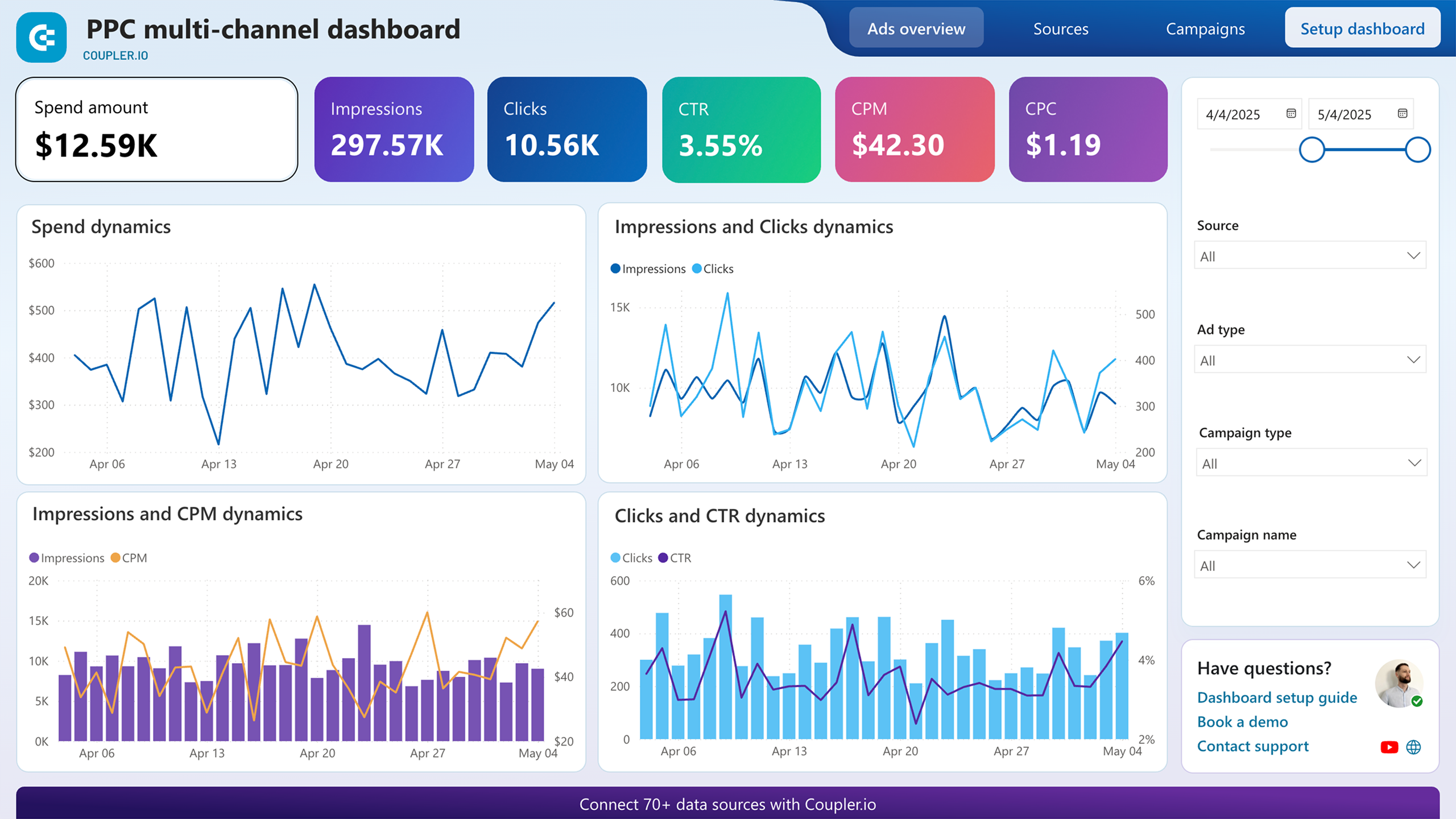
Not every metric needs a real-time view. A live dashboard should be small enough to read in ten seconds. Prioritize these:
Traffic and source metrics
- Sessions and users by channel (paid search, paid social, email, organic, referral)
- Landing page views per campaign
- UTM-tagged session counts by campaign name
Engagement metrics
- Bounce rate or engagement rate by landing page
- Scroll depth or time on page for campaign pages
- Event completions such as video plays, form starts, and add-to-cart actions
Conversion metrics
- Conversions by campaign and by channel
- Conversion rate by landing page variant
- Cost per acquisition, if ad spend is connected
Health metrics
- Error rates and 404s on campaign URLs
- Page load time for campaign landing pages
- Tracking tag firing status
That last group is the one most teams skip, and it is often the reason a campaign looks like it is failing when the traffic is simply landing on a broken page.
How to Set Up Tracking That Produces Clean Data

Real-Time Marketing Campaign Tracking: A Practical Setup Guide - How to Set Up Tracking That Produces Clean Data.
Real-time dashboards are only as good as the data feeding them. Four setup steps prevent most downstream confusion.
1. Standardize UTM parameters before launch
UTM parameters are the backbone of campaign attribution. Inconsistent naming is the single most common cause of fragmented reports. Agree on lowercase, hyphenated values and lock them in a shared naming document. Decide in advance whether campaign names include the year, the region, or the creative variant.
If you need a broader walkthrough of how marketers structure this layer, see this practical guide to marketers campaign tracking.
2. Track events, not just pageviews
Pageviews tell you someone arrived. Events tell you what they did. Define a small set of meaningful events per campaign, such as form submissions, demo requests, checkout starts, and completed purchases. Keep the event names stable across campaigns so historical comparisons remain valid.
3. Connect spend data to behavior data
Conversion counts without cost data cannot tell you whether a campaign is profitable. Either import ad spend into your analytics reporting or maintain a simple spend table that maps campaign names to daily cost. The mapping only works if campaign names match your UTM values exactly.
4. Verify tracking before you spend
Run a test click through every campaign URL, confirm the UTM values register in your analytics tool, and check that conversion events fire. This takes fifteen minutes and prevents the most expensive category of campaign error: spending against untracked traffic.
Choosing the Right Tool for Live Campaign Views
There are three broad categories of tooling, and most teams end up combining at least two.
| Tool type | Strength | Limitation |
|---|---|---|
| Website analytics platforms | Real-time traffic, source, and conversion data tied to actual site behavior | Limited ad spend and creative-level detail |
| Ad platform dashboards | Spend, impressions, and platform-reported conversions | Attribution is platform-specific and often inflated |
| Project or campaign trackers | Planning, budgets, timelines, and team ownership | Not a source of behavioral truth |
For the behavioral layer, a website analytics platform is the right home. Data4, for example, is a website analytics platform positioned as a simpler alternative to Google Analytics, with real-time traffic tracking, audience segmentation, and conversion analysis. For teams that want live campaign behavior without configuring a complex property structure, that kind of tool covers the core need: which campaigns are driving sessions, and what those sessions do next.
If you are comparing options, this breakdown of Data4 vs Google Analytics vs Similarweb covers setup effort, data ownership, and pricing differences. Teams that need live data inside their own dashboards rather than a vendor interface should also look at how the Data4 API exposes real-time analytics data.
A campaign tracker template, such as the free one offered by Airtable, handles the planning side well: goals, budgets, owners, and timelines. It is not a substitute for behavioral analytics, but the two work together. Broader tool comparisons, like this roundup of marketing analytics tools from Salesforce, are useful when you are evaluating the wider stack.
Setting Up Alerts That Actually Help
A live dashboard only works if someone is watching it. Alerts solve that problem, but only if they are tuned. Too many alerts and the team ignores them; too few and problems run for hours.
Set thresholds around deviation, not absolute numbers:
- Traffic alerts: Sessions to a campaign landing page drop more than 40% versus the same hour last week.
- Conversion alerts: Conversion rate falls below half of the trailing seven-day average.
- Technical alerts: 404 rate on campaign URLs exceeds 1%, or average page load time exceeds three seconds.
- Spend alerts: Cost per acquisition exceeds target by more than 50% for two consecutive hours.
Route alerts to a channel someone actually monitors. An alert that lands in an unread inbox is the same as no alert.
Common Mistakes That Corrupt Real-Time Data
Even well-built setups produce misleading live numbers. Watch for these patterns:
- Counting platform-reported conversions as truth. Ad platforms claim conversions that your analytics tool may not see, especially where consent blocks tracking or where attribution windows differ. Treat platform numbers as directional.
- Ignoring consent and privacy effects. Where consent management is in place, some sessions will not be fully trackable. This is expected, not a bug. If your live numbers look lower than platform numbers, consent is a common reason. A consent management platform determines how much of this gap you can close legitimately.
- Comparing partial days to full days. A live dashboard at 10 a.m. will always look worse than yesterday's total. Compare like-for-like time windows.
- Letting campaign names drift. A single uppercase letter in a UTM value splits a campaign into two rows and halves your reported performance.
- Watching vanity metrics. Live pageviews feel good but rarely change a decision. Live conversion rate and cost per acquisition do.
A Simple Weekly Operating Rhythm
Real-time tracking works best when paired with a fixed review cadence:
- Daily, 15 minutes: Check alerts, confirm tracking is firing, and scan conversion rate by channel.
- Mid-campaign, 30 minutes: Compare channel performance against targets and reallocate budget where the data supports it.
- Post-campaign, 60 minutes: Reconcile analytics data with platform and finance data, then document what changed and why.
The daily check is about catching breakage. The mid-campaign review is about optimization. The post-campaign review is about learning.
Related reading
- Real-Time Blog Traffic Monitoring: Tools, Metrics & Setup - Learn how real-time blog traffic monitoring works, which metrics matter, the best tools, and how to set up alerts that catch spikes and outages fast.
- Data4 vs Heap vs Mixpanel: Which Analytics Tool Fits? - Compare Data4, Heap, and Mixpanel on setup, tracking depth, reporting, and pricing to choose the right analytics tool for your website or product team.
Sources and further reading
- How To Track Marketing Campaigns (With 10 Methods) | Indeed.com - Jun 16, 2026 ... Monitoring and adjusting marketing campaigns as needed: Tracking gives you data in real time as the campaign occurs. Based on this real-time ...
FAQ
How fast is "real-time" in most analytics tools?
Most website analytics platforms surface pageviews and events within seconds to a couple of minutes. Aggregated metrics like conversion rate by channel often refresh on a short delay. Ad platform data typically lags by several hours.
Can I track campaigns in real time without UTM parameters?
Yes, but attribution becomes much harder. Referral data and click identifiers can partially identify sources, but UTM parameters remain the most reliable way to connect a session to a specific campaign, channel, and creative.
Why do my analytics conversions differ from my ad platform conversions?
Differences come from attribution windows, cross-device behavior, consent restrictions, and how each system defines a conversion. Expect a gap and decide in advance which source you treat as the reporting standard.
What should trigger an immediate campaign pause?
A sustained cost per acquisition well above target, a landing page returning errors, or a conversion event that has stopped firing entirely. All three are visible in live data and all three waste budget quickly.
Do I need a separate tool for campaign planning and campaign tracking?
Usually, yes. Planning tools manage goals, budgets, and ownership. Analytics tools measure what visitors actually did. Trying to force one tool to do both typically produces weak reporting on one side.
Conclusion
Real-time marketing campaign tracking is less about watching a dashboard and more about shortening the distance between a signal and a decision. Get the tracking layer right with consistent UTM values and stable event names, keep the live dashboard small, set alerts around meaningful deviations, and accept that platform numbers and analytics numbers will never match perfectly.
Start with the behavioral layer: confirm that every campaign URL is tagged, that conversion events fire, and that you can see sessions and conversions by channel within minutes. Once that foundation is solid, real-time data stops being a novelty and starts being the reason you catch problems before they cost you.