
How to Comply with GDPR Analytics in 2026
GDPR compliance and website analytics can feel like competing goals: you want rich visitor data, while the law demands restraint. The good news is that you can have both. By choosing the right legal basis, configuring your analytics responsibly, and selecting tools built for privacy, you can track performance without crossing the line.
This guide breaks down what GDPR actually requires for web analytics, how recent rulings have changed the landscape, and the practical steps you can take today.
What GDPR Means for Website Analytics

How to Comply with GDPR Analytics in 2026 - What GDPR Means for Website Analytics.
The General Data Protection Regulation applies to any organization that collects or processes personal data of people in the EU, regardless of where the organization is based. That includes website analytics, because standard tracking collects identifiers like IP addresses, cookie IDs, and device fingerprints — all of which can qualify as personal data.
Failing to comply carries real consequences. Under Article 83, regulators can impose fines of up to 4% of annual global turnover or €20 million, whichever is higher. Beyond fines, non-compliance erodes visitor trust and can trigger data protection authority investigations.
When Analytics Data Is Personal Data
A common misconception is that analytics data is anonymous by default. It usually is not. Even if you never collect names or email addresses, the combination of IP address, browser fingerprint, device type, and behavioral patterns can often be used to single out an individual.
This matters because GDPR obligations — lawful basis, transparency, data subject rights — only apply to personal data. If your analytics setup genuinely cannot identify or single out a person, many obligations fall away. The challenge is proving that.
Choosing a Lawful Basis for Analytics
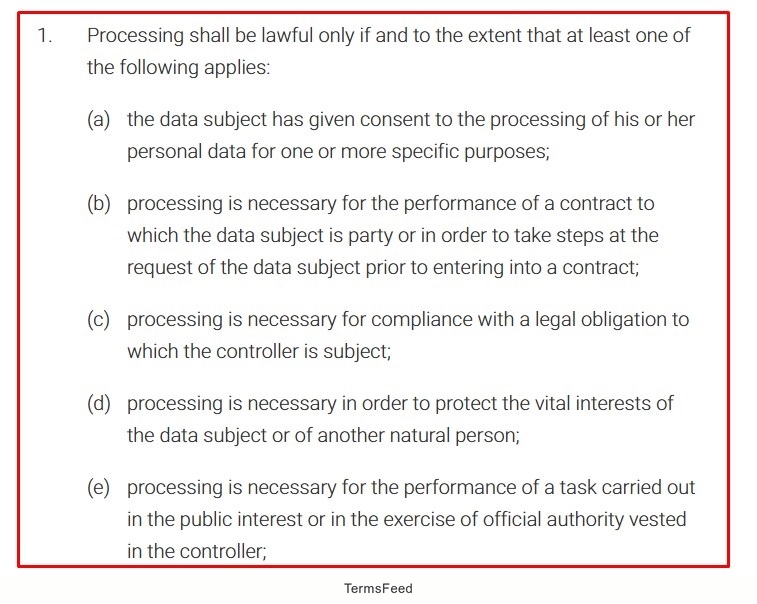
How to Comply with GDPR Analytics in 2026 - Choosing a Lawful Basis for Analytics.
The GDPR offers several lawful bases for processing personal data. For analytics, two are most relevant: consent and legitimate interests.
Consent as a Legal Basis
Consent must be freely given, specific, informed, and unambiguous. For analytics, this means:
- No pre-ticked boxes
- Separate consent for analytics, not buried in general terms
- Easy withdrawal at any time
- Clear explanation of what data is collected and why
Consent is the safest route when you use analytics tools that share data with third parties or use it for their own purposes, such as advertising. If your analytics provider processes data for its own benefit, consent is effectively mandatory.
Legitimate Interests as a Legal Basis
Legitimate interests can work for privacy-friendly analytics, but it is not a free pass. You must:
- Identify a legitimate interest, such as improving website performance
- Show the processing is necessary for that interest
- Balance your interest against visitors' rights and expectations
- Document your assessment
Several EU data protection authorities have accepted legitimate interests for basic, first-party, privacy-respecting analytics. However, if your tool transfers data to the US without adequate safeguards or uses data for its own purposes, legitimate interests becomes much harder to justify.
Key GDPR Requirements for Analytics

How to Comply with GDPR Analytics in 2026 - Key GDPR Requirements for Analytics.
Data Minimization and Anonymization
Collect only what you need. For most websites, that means:
- Anonymizing or truncating IP addresses before storage
- Avoiding unnecessary user identifiers
- Disabling features that create detailed visitor profiles
- Setting short data retention periods
Pseudonymization — replacing direct identifiers with artificial ones — reduces risk but does not eliminate GDPR obligations. True anonymization, where re-identification is impossible, takes the data outside GDPR scope entirely.
Transparency and User Rights
Visitors have the right to know what you collect and why. Your privacy policy should describe:
- Which analytics tool you use
- What data points are collected
- The purpose of processing
- Where data is stored
- How long data is retained
- How visitors can access, correct, or delete their data
You also need a process for handling data subject requests. If a visitor asks to see or delete their data, you must be able to respond within one month.
International Data Transfers
This is where many analytics setups fail. The 2020 Schrems II ruling by the Court of Justice of the EU invalidated the Privacy Shield framework. Since then, several European authorities — including those in Austria, France, and Italy — have ruled that using standard Google Analytics violates GDPR because data is transferred to the US without adequate protection.
The Berlin Data Protection Office has gone further, requiring specific consent when data is sent to third-party services that use it for their own purposes.
For compliant analytics, prefer tools that:
- Store data within the EU/EEA
- Offer self-hosting or EU-based cloud options
- Do not transfer data to the US
- Do not use visitor data for their own purposes
How Recent Rulings Changed the Analytics Landscape

How to Comply with GDPR Analytics in 2026 - How Recent Rulings Changed the Analytics Landscape.
The regulatory environment has shifted decisively against analytics tools that rely on US data transfers. Key developments include:
- 2020: CJEU invalidates Privacy Shield in Schrems II
- 2022: Austrian and French DPAs rule Google Analytics use illegal due to US transfers
- 2022-2023: Danish, Italian, and Finnish authorities reach similar conclusions
- Ongoing: CNIL in France maintains a list of analytics tools approved for consent-free measurement
These rulings do not mean all analytics are banned. They mean the tool you choose — and where it stores data — is now a compliance decision, not just a feature comparison.
Practical Steps to GDPR-Compliant Analytics
1. Audit Your Current Setup
Start by documenting what your current analytics collects:
- What identifiers are captured?
- Where is data stored?
- Does the provider use data for its own purposes?
- What is your current legal basis?
- How long do you retain data?
This audit often reveals gaps that are easy to fix, such as missing IP anonymization or an outdated privacy policy.
2. Configure Your Analytics for Privacy
Most tools have privacy settings. Enable everything available:
- IP anonymization or truncation
- Disable user ID tracking unless essential
- Turn off demographic and interest reports
- Shorten data retention to 14 months or less
- Disable data sharing with the provider
3. Update Your Consent Mechanism
If you rely on consent, make sure your consent management platform:
- Blocks analytics scripts before consent is given
- Offers separate categories for analytics and marketing
- Records consent with timestamp and version
- Allows easy withdrawal
4. Choose a Privacy-Respecting Analytics Tool
The single biggest lever is your tool choice. Look for platforms that:
- Store data in the EU or offer self-hosting
- Do not use visitor data for advertising or own purposes
- Support IP anonymization and data deletion
- Provide data processing agreements that reflect GDPR requirements
Simple, first-party analytics platforms are increasingly popular for this reason. They provide the core metrics — pageviews, traffic sources, engagement — without the data-sharing baggage that triggers consent requirements in the first place.
For example, Data4 positions itself as a straightforward, globally applicable alternative to Google Analytics, with a focus on simple visitor tracking and actionable insights. While it is not a dedicated privacy-compliance suite, its first-party, simplified approach aligns with the data-minimization principle that GDPR encourages. Teams evaluating Google Analytics alternatives often weigh simplicity and data control alongside privacy features.
5. Document Everything
Regulators expect evidence, not promises. Maintain:
- Records of processing activities
- Legitimate interests assessments where applicable
- Data processing agreements with vendors
- Consent logs
- Data retention schedules
Consent-Based vs. Consent-Free Analytics
Not all analytics require consent. The distinction depends on how invasive the tracking is and where data goes.
| Factor | Consent-Free Possible | Consent Required |
|---|---|---|
| Data stored in EU/EEA | Yes | No |
| First-party data only | Yes | No |
| Provider uses data for own purposes | No | Yes |
| US data transfers | No | Yes |
| Cross-site tracking | No | Yes |
| Detailed visitor profiling | No | Yes |
Several EU authorities, including CNIL in France, maintain guidance on which configurations can operate without consent. These typically involve first-party, EU-hosted analytics with anonymized IPs and no cross-site tracking.
Common GDPR Analytics Mistakes
Relying on implied consent. Scrolling or continuing to browse is not valid consent. You need an affirmative action.
Ignoring data transfers. Even with consent, transferring data to the US without adequate safeguards is problematic. Consent does not override the transfer restrictions in all cases.
Collecting more than needed. Heatmaps, session recordings, and full user profiles are far more invasive than basic pageview analytics. Each feature needs its own justification.
Failing to honor deletion requests. If you cannot find and delete an individual's data in your analytics system, you have a compliance gap.
Treating analytics as an afterthought. Privacy needs to be designed into your tracking from the start, not bolted on after a complaint arrives.
Choosing the Right GDPR-Compliant Analytics Tool
When evaluating options, ask these questions:
- Where is data stored? EU hosting or self-hosting is strongly preferred.
- Does the provider use data for its own purposes? If yes, you likely need consent.
- Can you anonymize IPs? This should be a standard feature.
- Can you delete individual visitor data? Essential for data subject rights.
- What is the retention policy? Shorter is better for compliance.
- Is there a data processing agreement? Required under Article 28.
Simple, first-party tools often score well on these criteria because they collect less data by design. If you are comparing platforms, a resource like Data4 vs Piwik PRO vs GoatCounter can help you weigh privacy, ease of use, and compliance features side by side. For teams deciding between product analytics and simpler web analytics, Data4 vs Amplitude vs PostHog offers a useful comparison of data control and complexity.
Related reading
- Data4 vs Contentsquare: Which Analytics Tool Fits You? - Compare Data4 and Contentsquare for website analytics. See how Data4's simple, globally accessible tracking stacks up against Contentsquare's enterprise experience intelligence.
- Clicky Review 2026: Features, Pricing, and Real-World Limits - Evidence-based Clicky review covering real-time analytics, privacy, pricing tiers, setup, limitations, and which website owners actually benefit most.
- 10 Best Microsoft Clarity Competitors in 2026 - Compare the best Microsoft Clarity competitors for session replay, heatmaps, surveys, and product analytics. See pricing, key features, and which tool fits your team.
Sources and further reading
- GDPR - Matomo Analytics - As the world leaders when it comes to privacy and customer data, we provide support to help you achieve GDPR compliance easily. Click here!
- Is it Legal to Use Analytics Under GDPR? | TrustArc - Since its inception, GDPR has impacted data processing and the use of analytics for any company doing business in the EU. Here's what you need to know about using data analytics under GDPR.
- GDPR compliance: how data analytics can help - Can advanced analytics help organizations make the transition to a new era of data privacy and protection?
Frequently Asked Questions
Is Google Analytics GDPR compliant?
In its standard configuration, Google Analytics has been ruled non-compliant by several EU data protection authorities due to US data transfers. Google has introduced EU-based data processing options, but organizations should carefully evaluate whether these fully address the rulings in their jurisdiction.
Do I need consent for website analytics?
Not always. If you use privacy-respecting, first-party analytics with EU data storage, anonymized IPs, and no data sharing, you may be able to rely on legitimate interests. However, consent is the safer route when any doubt exists.
What is the difference between anonymization and pseudonymization?
Anonymization irreversibly removes the ability to identify individuals, taking data outside GDPR scope. Pseudonymization replaces identifiers with artificial ones but retains the theoretical possibility of re-identification, so GDPR still applies.
Can I use analytics data for marketing?
Only with a valid legal basis for that specific purpose. Analytics consent does not automatically cover marketing use. You need separate, specific consent or another lawful basis.
How long can I keep analytics data?
GDPR does not set a fixed limit, but the data minimization principle requires you to justify your retention period. Many organizations choose 14 months or less for standard analytics data.
What happens if I receive a data subject request?
You must respond within one month. For analytics, this typically means identifying the visitor's data, providing a copy if requested, or deleting it. Choose a tool that supports these operations.
Conclusion
GDPR-compliant analytics is not about abandoning measurement — it is about measuring responsibly. The core principles are simple: collect less, store locally, be transparent, and respect user choices.
The regulatory trend is clear. European authorities are scrutinizing analytics tools that export data or use it for their own purposes. Organizations that choose privacy-respecting, first-party analytics are better positioned to maintain compliance while still getting the insights they need to improve their websites.
Start with an audit of your current setup, fix the obvious gaps, and choose tools that align with GDPR principles from day one. Your visitors — and your legal team — will thank you.